Expertise
5 min reading
3 June 2026
3 June 2026
Understanding LoRaWAN Gateway Receiver Performance: The Three Numbers That Matter

At TEKTELIC, we have been building and deploying LoRaWAN infrastructure for over ten years. In that time, we have helped operators, enterprises, utilities, and system integrators choose gateways for every kind of site, from quiet rural fields to crowded city rooftops.
One question comes up again and again when teams compare gateways: which one has the best receiver sensitivity number? It is a fair question. But it is also the wrong place to stop.
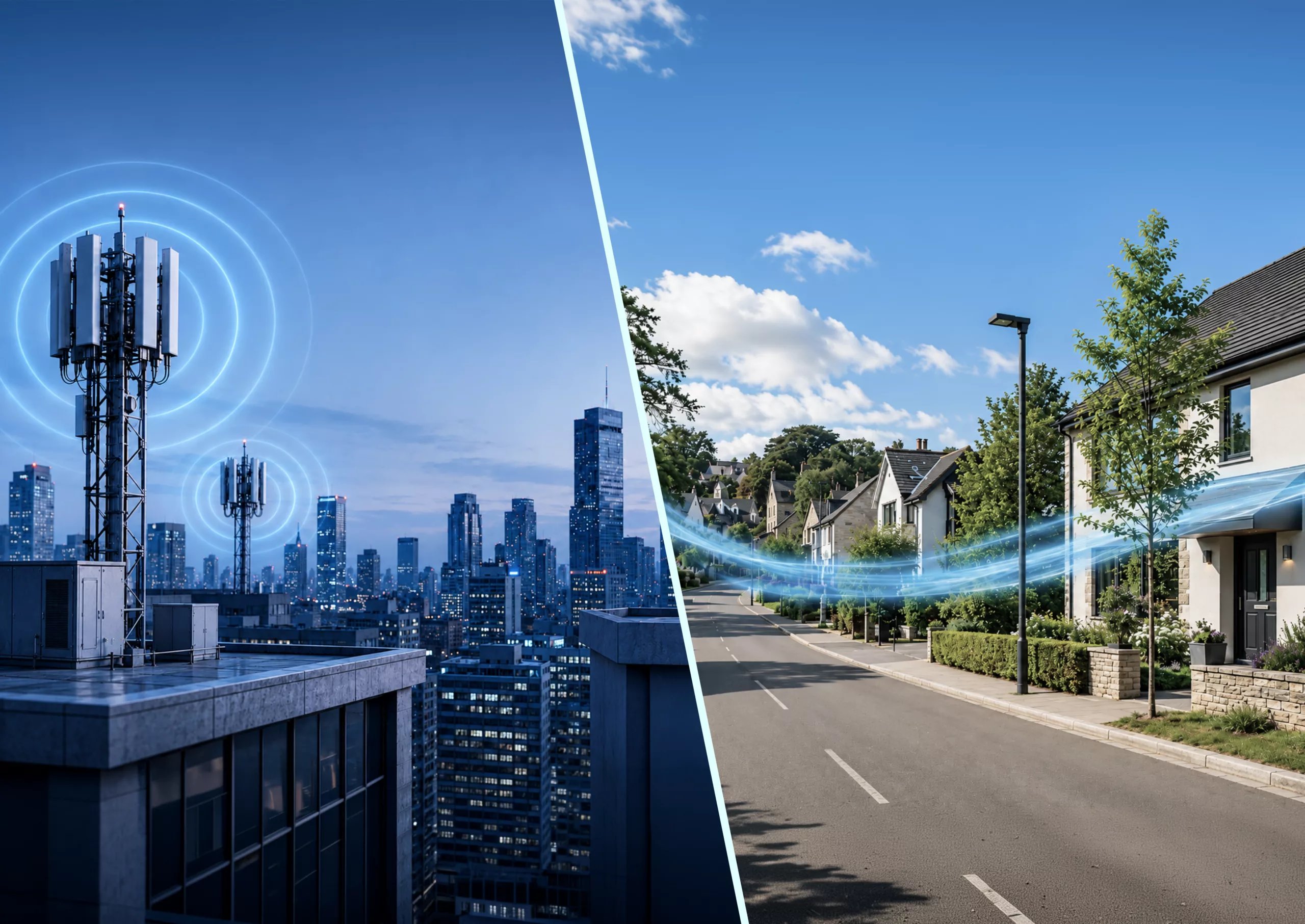
A gateway’s datasheet receiver sensitivity is measured in a silent laboratory. However, your network does not run in a silent laboratory. It runs on rooftops next to cellular antennas, on towers, in factories, and across smart-city infrastructure. These places are full of strong, competing radio signals.
With this article, we want to make that comparison easier. We will walk you through the three receiver parameters that actually decide how a gateway performs in the field: noise figure, receiver sensitivity, and receiver linearity, and show you why the gateway with the best lab number is not always the one that keeps your network running.
Key takeaway
Receiver sensitivity tells you how well a gateway hears weak signals in a quiet lab. Linearity tells you whether it can still hear them in the real world, where strong LTE, 5G, and other RF signals are present. The best carrier-grade gateways combine low noise figure, excellent sensitivity, high linearity, and strong RF filtering, so they continue to perform where it actually matters: in the field.
What this article covers
- What a LoRaWAN gateway has to do
- Noise figure
- Receiver sensitivity
- Linearity
- How the three work together
- Three listening scenarios
- What to look for in a gateway
What a LoRaWAN gateway has to do
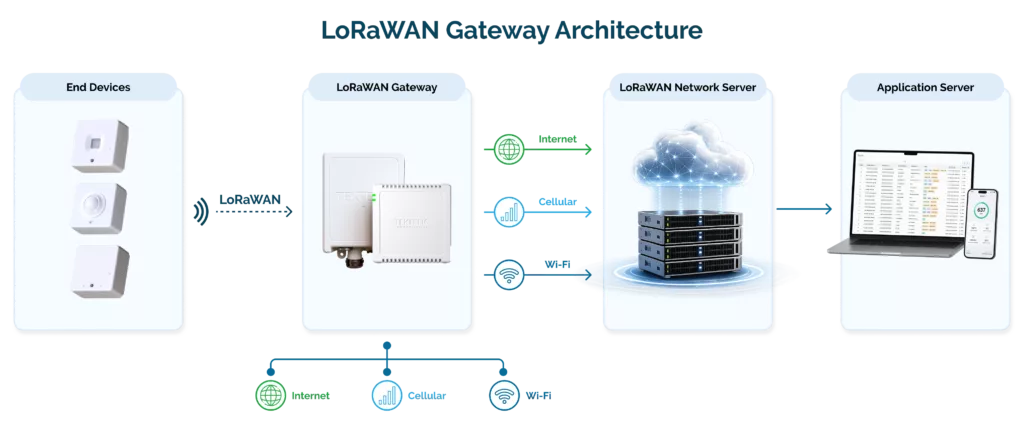
A LoRaWAN gateway is the bridge between your sensors and your network. It listens for the tiny radio messages that battery-powered devices send, then forwards them to the network server, which passes the data to your application. A single gateway can cover kilometers of open ground, or reach deep into basements and metal cabinets where other wireless technologies give up.
Because the gateway is the part of the network that has to hear, its receiver design shapes almost everything about coverage and reliability.
The easiest way to understand it is to think of the gateway as a very attentive listener in a room full of people. Its job is to catch one faint whisper from across the room.
A good listener does two things at once:
- It hears very quiet voices
- It isn’t thrown off when someone nearby starts shouting
Hearing the whisper is what noise figure and sensitivity describe. Not being overwhelmed by the shouting is what linearity describes.
Noise figure
Every receiver hears a certain amount of natural background hiss, called thermal noise. On top of that, the gateway’s own electronics add a little noise. Noise figure is simply the amount of extra noise the gateway adds. The less it adds, the better it can hear faint signals from distant or hard-to-reach devices.
A simple example.
Picture a quiet room at night. A fly is buzzing somewhere in the middle, and because the room is silent, you can hear it. Now someone switches on a small fan beside your ear. The fly is still there, but the fan makes it much harder to hear. That fan is the receiver’s own noise. A good gateway adds very little “fan noise” of its own.
As a rough guide, a noise figure of 1–3 dB is excellent, and 3–4 dB is good for a gateway receiver. 5–6 dB is acceptable for many indoor or lower-cost gateways, and anything above 6 dB is weak for serious outdoor or carrier-grade deployments.
Noise figure matters most in quiet RF environments, a rural utility site, a private campus, a low-interference building. There, a lower noise figure directly improves sensitivity and coverage. But it is a laboratory measurement and does not describe how the gateway behaves once strong external signals enter the picture.
Noise figure helps set how well a gateway hears. Sensitivity quantifies the weakest signal it can actually decode.
Sensitivity
Receiver sensitivity is the weakest LoRaWAN signal a gateway can receive and still decode correctly. It is measured in dBm, and the more negative it is, the better. In short, −142 dBm is better than −136 dBm. In practice, receiver sensitivity helps define the link budget a LoRaWAN gateway can achieve in low-noise conditions.
A simple example. Imagine trying to hear someone whispering from across a field. With excellent hearing, you catch the words. With poor hearing, you don’t. Sensitivity is the gateway’s ability to make out very quiet whispers from far-off devices.
| Receiver sensitivity | What it means in practice |
| Around −135 dBm or worse | Poor |
| −136 to −137 dBm | Acceptable |
| −138 to −140 dBm | Good |
| −141 to −142 dBm | Excellent |
These figures assume defined test conditions — spreading factor, bandwidth, coding rate, packet error rate, and temperature. LoRa sensitivity depends heavily on spreading factor and bandwidth.
There is something remarkable here:
- A LoRaWAN gateway can decode signals that sit below the noise floor
- LoRa modulation works at a negative signal-to-noise ratio thanks to the processing gain of higher spreading factors such as SF10 to SF12.
Semtech, the creator of LoRa, notes that the technology can receive roughly 20 dB below the thermal noise floor. This is a big part of why LoRaWAN reaches so far and penetrates buildings so well, though higher spreading factors come at the cost of data rate and longer time on air. If you want to dig into how the spreading factor shapes coverage, we cover it in how to improve LoRaWAN gateway performance.
Sensitivity is measured by feeding a known signal into the gateway and turning it down step by step until the gateway can no longer decode packets reliably, typically at a 5% to 10% packet error rate. The lowest level it can still handle becomes the published sensitivity figure.
That measurement is conducted inside an RF chamber with approximately 80 dB of isolation, with no cellular antennas, no industrial noise, and no rooftop interference. The number is real and useful. It just does not tell you how the gateway behaves in the noisy environments where most networks actually run.
Which brings us to the parameter that quietly decides real-world performance and the one buyers most often overlook.
Linearity
Receiver linearity is how well a gateway handles strong nearby signals without becoming overloaded. A gateway with poor linearity can look excellent in a lab, then struggle the moment it is installed near cellular antennas, private radios, or industrial equipment. When the receiver’s front end is overloaded, it can stop detecting the weak LoRaWAN devices that it would easily detect in a quiet setting. In fact, gateway linearity matters more than noise figure in urban areas.
Engineers describe linearity with a handful of parameters:
- P1dB (where the receiver’s gain starts to compress)
- IIP2 and IIP3 (the intercept points that govern intermodulation distortion)
- Blocking performance (tolerance to strong signals outside the band)
Of these, a high IIP3 is especially important because it keeps the receiver from generating its own interference, an IM3 product that can land right inside the LoRaWAN band and drown out the real signal.
In a typical urban, suburban, or industrial deployment, the gateway is surrounded by strong signals:
- LTE and 5G base stations
- Utility and public-safety radios
- Broadcast and paging transmitters
- Industrial motors and drives, and the dense RF of airports, campuses, and rooftops
If the receiver is not linear enough, it is overloaded and loses the ability to hear weak packets. Strong RF filtering against electromagnetic interference is what keeps these signals out of the front end.
Why receiver desensitization really matters?
When strong signals overload a gateway, it goes “deaf” to weak sensors, even though it is still powered on and still shows great sensitivity on paper. The result in the field is high packet loss, shrinking coverage, and unreliable reception. On the one hand, the datasheet looks fine, but on the other, the network does not.
Noise figure, sensitivity, and linearity are related but not the same thing, and confusing them is how good gateways get chosen for the wrong sites.

How the three work together
Sensitivity is largely set by noise figure: a lower noise figure generally means better sensitivity. But excellent sensitivity does not guarantee good real-world performance. A receiver can post a brilliant number in a clean environment and still fall apart the moment strong out-of-band signals arrive — and most deployments are exactly that kind of environment. In those places, linearity is what preserves the gateway’s range and packet success rate.
There is a genuine design trade-off behind this. A very low-noise-figure front end under 3 dB is usually not the most linear, because chasing minimum noise tends to mean more gain and less filtering ahead of the mixer, which reduces tolerance to strong signals. Good receiver design is a balance of low noise, gain, filtering, and linearity. Careful RF front-end engineering and proper filtering are what protect performance once the gateway leaves the lab.
The short version:
- Noise figure helps the gateway hear weak signals
- Sensitivity defines how weak those signals can be
- Linearity decides whether it can still hear them when the RF environment is noisy — which is most of the time
Three human listening scenarios that explain it all
- The quiet rural site
The room is silent and the fly is faint but easy to hear. This is a gateway in a quiet rural environment, where noise figure and sensitivity matter most. A better receiver simply hears weaker signals.
- The typical urban site
There is plenty of background noise, but you can still follow your friend if your hearing separates the useful voice from the din. This is where linearity becomes essential: the gateway hears weak sensors while ignoring the strong, unwanted signals around it.
- Too close to strong transmitters
The person speaking may be right next to you, but the jet is so loud that your ears are overwhelmed. In RF terms, the receiver is overloaded: sensitivity collapses, packet loss climbs, coverage shrinks. This is what happens near powerful LTE/5G antennas without enough filtering or linearity.
What to look for in a gateway
A gateway with great sensitivity but weak linearity can shine in a lab and disappoint on a rooftop, tower, factory, or city pole. A genuinely carrier-grade gateway brings the whole picture together:
- Good noise figure – to hear weak signals in quiet environments
- Excellent sensitivity – for a strong link budget and wide coverage
- High linearity – to stay sensitive when strong interferers are nearby
- Strong RF filtering – to reject out-of-band signals before they overload the front end
- Robust front-end design – to hold all of it together over the years in the field
This balance is exactly what we engineer into TEKTELIC’s carrier-grade KONA gateway portfolio, from the solar-powered KONA Photon for remote sites to the KONA Enterprise for cost-effective indoor coverage to the KONA Macro and 64-channel KONA Mega for high-capacity outdoor, rooftop, telecom, and industrial deployments.
The goal is always the same: dependable coverage and a high packet success rate in the real, noisy places where networks live.
Key things you need to keep in mind while choosing your gateway
- Look past the single sensitivity figure
- Ask how the receiver behaves when strong signals are present, what filtering protects the front end, and how the design balances noise, gain, and linearity
- For rural sites, low noise figure and strong sensitivity lead
- For urban, industrial, utility, smart-building, and rooftop sites, linearity and filtering matter just as much and often more
The best LoRaWAN gateways are the ones that can still hear a whisper even when the world around them is shouting.
Want to talk through your deployment?
Whether you are planning a new network, expanding an existing one, or troubleshooting coverage that looks fine on paper, we are happy to have a straightforward conversation about which gateway fits your RF environment.
Reach out to our team: info@tektelic.com